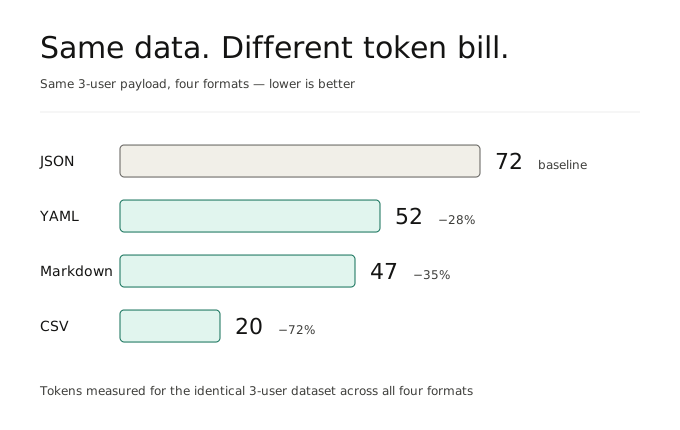
If you are feeding structured data into an LLM, there is a good chance you are paying a JSON tax — and you do not need a new format to fix it.
Introduction
JSON is great for APIs, storage, and application logic. But inside large language model (LLM) pipelines, it often carries a lot of token overhead that does not add much value to the model: braces, quotes, commas, and repeated field names on every row.
The good news is that you do not need to adopt some exotic new serialization format to fix this. Three formats your stack already understands — YAML, Markdown tables, and CSV — can each cut your prompt token count significantly when used in the right place. The trick is knowing which to reach for, and when.
In this article, you will see why JSON gets expensive in prompts, three drop-in alternatives, and a decision guide for picking the right one. We will also keep the tradeoffs honest, because no single format wins everywhere.
Why JSON Wastes Tokens in LLM Pipelines
JSON becomes expensive in prompts because it repeats structure over and over again. LLMs do not care that JSON is a standard. They only see tokens.
If you send 100 support tickets, product rows, or user records to a model, the same field names appear in every object, each wrapped in quotes, with commas and braces between them. None of that helps the model reason. It just inflates your input bill.
Consider this small payload:
json
{
  "users": [
    { "id": 1, "name": "Alice", "role": "admin" },
    { "id": 2, "name": "Bob", "role": "user" },
    { "id": 3, "name": "Charlie", "role": "user" }
  ]
}
You are paying for "id", "name", and "role" three times each, plus a forest of quotes and commas. Multiply that across hundreds of records and the waste adds up fast.
The fix is not always to invent a new format. Often, the right format is one you already use somewhere else in your codebase. The three below cover most cases.
1. YAML — The Sweet Spot for Readability and Token Savings
If you want the model to genuinely understand structure, including some nesting, YAML is usually the best swap.
Why it works: No curly braces, no quotes around keys, no commas at every step. The structure is conveyed by indentation alone. That shaves a meaningful number of tokens off most payloads, and the result is also more readable to humans reviewing the prompt.
The same data in YAML:
yaml
users:
  - id: 1
    name: Alice
    role: admin
  - id: 2
    name: Bob
    role: user
  - id: 3
    name: Charlie
    role: user
When to prefer it:
- Medium-to-large structured payloads where you want to cut input cost
- Data with nesting that would be hard to read as a flat table
- Configuration-like inputs: settings, schemas, agent instructions
When to skip it: Very large uniform arrays — at that point a table format compresses better. Also be careful with any data where leading whitespace or special characters matter; YAML’s indentation sensitivity will bite you.
2. Markdown Tables — For Uniform Records and Comparisons
If your JSON is essentially a list of similar objects with the same fields — a product catalog, a list of tickets, a set of users — convert it to a Markdown table.
Why it works: LLMs are trained heavily on Markdown. They read tables fluently, spot patterns easily, and can reference specific rows and columns when you ask follow-up questions. Field names appear exactly once, in the header row.
The same example:
markdown
| id | name    | role  |
|----|---------|-------|
| 1  | Alice   | admin |
| 2  | Bob     | user  |
| 3  | Charlie | user  |
When to prefer it: Anything where the model needs to compare, rank, classify, or summarize across rows. Catalog descriptions, evaluation results, ticket triage, side-by-side comparisons.
When to skip it: Nested data does not fit cleanly in a table. If your records have arrays or sub-objects inside them, flattening into Markdown either loses information or becomes unreadable.
3. CSV — For High-Volume, Flat, Numeric Data
If you have a large volume of flat records — especially numeric ones — CSV is the densest format you can hand a model.
Why it works: Almost no syntax overhead at all. One header row, then values separated by commas. For analytics and statistics tasks, it is also the format the model is most likely to have seen paired with real data analysis examples during training.
csv
id,name,role
1,Alice,admin
2,Bob,user
3,Charlie,user
When to prefer it: Asking the model to do statistical analysis, generate charts, summarize trends, or perform calculations over a large flat dataset. “Compute the average order value by region from this data” is a CSV prompt.
When to skip it: Anything with nesting, mixed types, or values that contain commas, quotes, or newlines. CSV quoting rules are a real source of bugs at scale, and a single malformed row can break the model’s interpretation of everything that follows.
What About Keeping JSON?
Do not write JSON off entirely. It is the native tongue of programming, and there are two cases where it is still the right call:
- Coding tasks. If the prompt is “write a function that processes this payload,” the model needs to see the exact shape it will encounter at runtime. Converting it is actively unhelpful.
- Small payloads. Below a certain size, the token savings do not justify the conversion step or the cognitive overhead of explaining the format in your prompt.
And critically, JSON is almost always the right format for outputs. Structured output APIs, tool-call arguments, and downstream parsers all expect JSON. The pattern that works well in practice is:
- JSON in your backend and APIs
- YAML / Markdown / CSV for large structured prompt context
- JSON again on the way back out
Quick Reference
| Goal | Format |
|---|---|
| Save tokens, keep readability, allow nesting | YAML |
| Compare or rank uniform records | Markdown table |
| Run numeric analysis on lots of flat data | CSV |
| Code generation against a specific shape | JSON (raw) |
The Bigger Lever: Filter Before You Format
One last thing, and arguably the most important: format choice matters less than payload size.
If your JSON is large, the highest-impact change is not to switch formats but to remove fields the model does not need. Strip internal IDs, timestamps, audit metadata, and any keys that exist for system reasons rather than reasoning reasons. A filtered JSON payload almost always beats an unfiltered YAML one.
Format optimization is the second pass. Filtering is the first.
Final Thoughts
There is no single “best” alternative to JSON for LLM prompts. There are three you almost certainly already know:
- YAML when you want clean structure with some nesting.
- Markdown tables when the model needs to read uniform records and compare them.
- CSV when you are pushing high volumes of flat, numeric data.
Pick based on the shape of your data and the task you are asking the model to do. Benchmark on your own pipeline before committing. And before you change format at all, ask whether the payload itself needs to be that big in the first place.