Introduction
If you have ever searched for your own digital footprint, you probably know Sherlock. You give it a username, it checks it against hundreds of websites and tells you where that username exists. It is fast, it is open source, and it is one of the most popular OSINT tools on GitHub.
But in real life you rarely start with a username. You start with something like:
“Bill Gates, the Microsoft co-founder. I know he uses
thisisbillgates, maybebillgatessomewhere else.”
And even when Sherlock finds billgates on 40 sites, the real question is still open: which of these accounts are actually him?
This is exactly the kind of work an AI agent is good at. It can reason about name variants, read profile pages, compare details and write things down. So I built sherlock-skill: an agent skill that takes a free-form description of a person and ends with a verified, self-contained HTML report.
- Site and live demo: https://vasilisplavos.github.io/sherlock-skill/
- Source: https://github.com/VasilisPlavos/sherlock-skill
If you prefer to watch rather than read, here is a short presentation:
What is a “skill”?
A skill is a folder with a SKILL.md file (instructions for the agent) plus any scripts, templates and reference documents it needs. The agent reads the short description, decides when the skill is relevant, and loads the details only when it needs them.
The nice thing is that it is becoming a common format. The same skill runs in Claude Code, OpenAI Codex, Gemini CLI, GitHub Copilot, Cursor and OpenCode. Installation details are on GitHub.
How it works
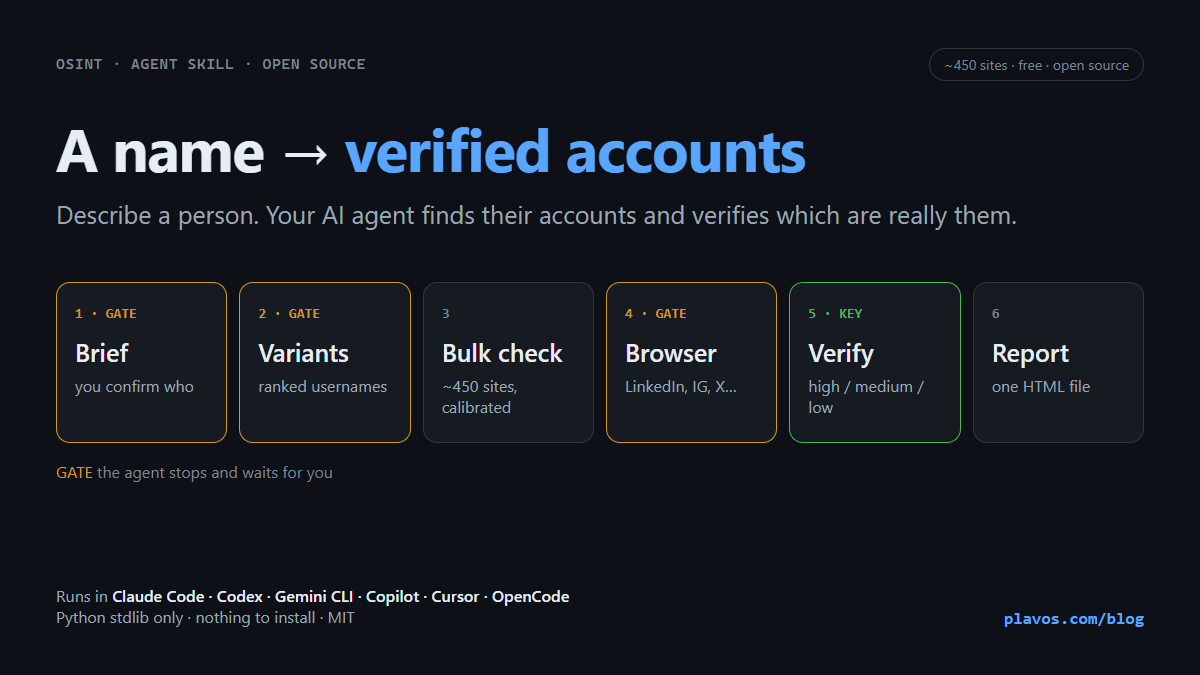
The workflow has six phases. Three of them are gates: the agent presents what it has and stops until you answer. I did this on purpose. An OSINT investigation that runs on wrong assumptions wastes thousands of requests and ends with confident nonsense.
1. Brief (gate). The agent sorts your description into names, known usernames, platforms where you have already seen the person, and other context (city, job, photo). If the brief is thin, it does a quick web search first. Then it writes back what you said versus what it assumes, and asks the important questions one at a time. “Is the Bill Gates in Seattle, the Microsoft co-founder, the right one?”
2. Username variants (gate). The agent generates candidates by reasoning: known handles first, then combinations like billgates, bill.gates, bgates, gatesbill, transliterations for non-Latin names, and so on. Every variant costs around 450 requests, so it ranks them and proposes only the top ~15. You approve the list.
3. Bulk check. A small Python script checks every variant against Sherlock’s site list. It runs in the background and reports progress and an ETA.
4. Browser checks (gate). Plain HTTP cannot see LinkedIn, Facebook, Instagram, X, TikTok or Threads properly, and some sites block bots. Here the agent looks at what browser tooling you have, explains the trade-offs (for example, that visits from a signed-in account can be visible to the person), and waits for your choice. It never logs in for you and never solves CAPTCHAs.
5. Identity verification. This is the part Sherlock does not do. The agent opens only the profiles that answered, reads the display name, bio, location, links and photo, and gives each one a score with a one-line reason:
- high: the name matches plus at least one independent detail (same city, same employer, links to a known profile, same photo)
- medium: the name or handle matches and nothing contradicts it
- low: only the handle matches, or the details conflict
New handles found along the way (for example, an Instagram linked from a YouTube bio) can start another round, with your approval.
6. Report. Everything ends in a single report.html file: the profiles grouped by confidence, the public contact details with their source URL, what could not be verified, and how long the run took. You can copy every field and export everything as JSON.
You can see a (trimmed) real run here: Bill Gates demo report.
Sherlock vs. Sherlock Skill
Here is how Sherlock and Sherlock Kill compare:
| Sherlock | Sherlock Skill | |
|---|---|---|
| Input | One or more exact usernames | A free-form description: names, known handles, context |
| Username variants | You come up with them yourself | The agent generates and ranks them, and you approve the list |
| Site list | Sherlock’s data.json (~450 sites) | The same data.json, downloaded fresh on every run |
| Installation | pip/pipx, Docker or a package manager, plus its dependencies | Nothing to install: Python standard library only, or no Python at all |
| False positives | Depends on each site’s rule in the manifest | Also checks a random username of the same shape and marks the site UNRELIABLE if it “finds” that too |
| Blocked sites (WAF, 403/429) | Detects some bot challenges (e.g. Cloudflare) | Any bot challenge or HTTP 403/429/5xx is marked WAF, so you know to recheck it in a browser |
| Login-walled platforms (LinkedIn, Facebook, Instagram, X, TikTok, Threads) | Only what plain HTTP can see | Browser checks and people search by name, with your permission |
| Identity verification | No: “username exists” is the result | Yes: reads every found profile and scores it high, medium or low with a reason |
| Output | Text, CSV or Excel list of URLs | A self-contained HTML report with confidence groups, sources, run details and JSON export |
| Human in the loop | No: you run it and read the list | Three stops where the agent waits for you: brief, variants, browser |
| Where it runs | A terminal | Claude Code, Codex, Gemini CLI, Copilot, Cursor, OpenCode, or any agent through the standalone file |
The skill is better when your real question is “find this person“. Its benefits come from what happens before and after the bulk check:
- Less to know upfront. You don’t need to know a username, only who you are looking for.
- Better coverage. Reasoned variants, transliterations and handles found in linked profiles reach accounts that a single username would miss.
- Fewer false positives. Calibration catches sites that claim every username exists, and verification drops profiles that belong to someone else with the same name.
- An answer instead of a list. You get “these 10 profiles are him, these 3 are probably him, these could not be checked”, each with a reason and a source.
- A shareable result. The HTML report is a single file you can open anywhere, archive or send.
- Safer by design. The stops, the rule against logging in, the rule against guessing emails and the responsible-use check keep the investigation honest.
Two ways to use it
Install it as a skill. Paste this into your agent:
Read https://vasilisplavos.github.io/sherlock-skill/install.md and install the sherlock skill
The agent takes care of the rest. For manual installation and other options, see the GitHub repository.
Or use it without installing. There is also a standalone version: one Markdown file that contains the whole workflow and the scripts. Any agent that can read a URL and run Python can follow it:
Read https://vasilisplavos.github.io/sherlock-skill/sherlock.md and follow it to find the accounts of <this guy>Responsible use
Use this tool ethically, to check your own footprint, for due diligence, or for research with a legitimate reason. It declines requests that look like stalking or harassing a private individual. It reports only what pages actually show, never guesses email addresses from name patterns, and never merges two people without evidence.
The demo is about a public figure, and even there I removed the low-confidence profiles that pointed to other private people with the same name.